
Here’s a guide to common pitfalls and how to create artwork that translates accurately from your screen to the final product.
Two Common Artwork Issues in Hybrid DTF / DTG Printing
1. Transparent Soft Edges
The Issue:
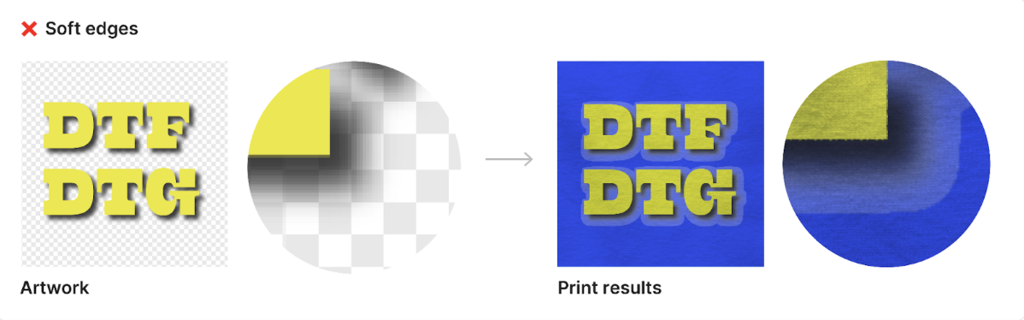
Effects such as drop shadows, feathered edges, or fading gradients often rely on transparency. In Hybrid DTF / DTG printing, both DTF transfers and DTG ink use a white underbase to ensure color vibrancy. Transparent fades can cause visible white halos, outlines, or harsh edge transitions where the underbase shows through.
Solution:
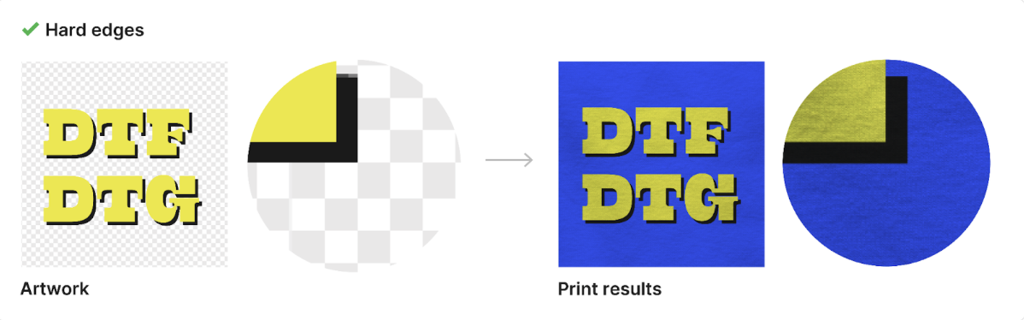
Avoid transparency in soft edges. Replace fading shadows or gradients with solid colors, hard edges, or transitions into another solid color rather than transparency.
2. Semi-Transparent Elements
The Issue:
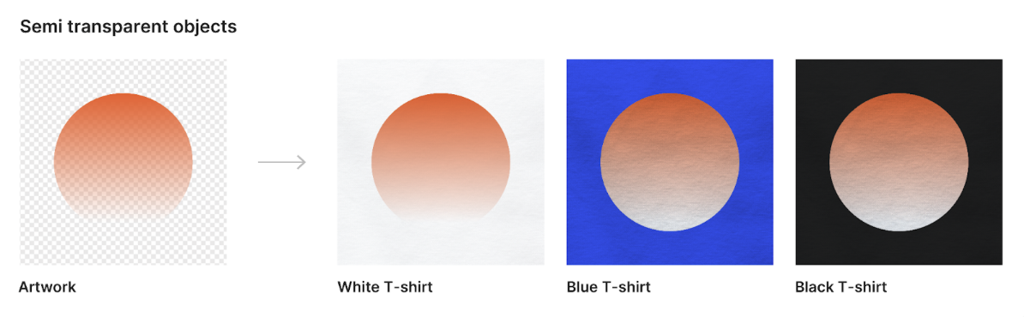
Design elements set below 100% opacity may print inconsistently. In Hybrid printing, semi-transparent layers can cause uneven ink coverage, muted colors, or unintended visibility of the white underbase.
Solution:
Ensure all design layers and objects are fully opaque (100% opacity) before exporting your final artwork.
Best Practices for Perfect Hybrid DTF / DTG Printing
Use solid and defined shapes
Avoid fading edges, semi-transparent areas, or overly intricate patterns. Bold, clearly defined elements produce the most reliable results.Design in high resolution
Create artwork at 300 DPI or in vector format to maintain sharp edges and clean details across both DTF and DTG processes.Choose bold colors and high contrast
For dark or textured garments, vibrant colors and strong contrast help designs stand out and print cleanly.Check line widths
All lines and strokes should be at least 8px wide to ensure proper ink coverage and durability.Check your backgrounds
Transparent backgrounds are recommended, but all visible design edges must remain fully opaque.Test and preview
Review your artwork carefully for hidden transparency, soft fades, or fine details that may not print as expected.
Why It Matters
Following these guidelines helps prevent common Hybrid DTF / DTG issues such as white halos, uneven ink coverage, dull colors, or missing details. This results in:
Vibrant, professional-quality prints
Happier customers who love their finished products
Fewer production delays or artwork rejections
Design with confidence, and let Hybrid DTF / DTG printing bring your artwork to life—cleanly and consistently.